
For the past few years our Nissan Leaf has been a house battery as well as a car. It sits on an Indra bidirectional charger, fills up on cheap night electricity and solar, then runs the house through the evening. Home Assistant decided how much to charge it each night, using a set of automations I wrote. Recently I handed the job to Predbat, a battery planner that runs inside Home Assistant, to see if it would do better.
This is the full Predbat and Home Assistant setup, written from a working system: every helper, script and automation, plus the things that caught me out along the way. First, what it looks like and what it saves.
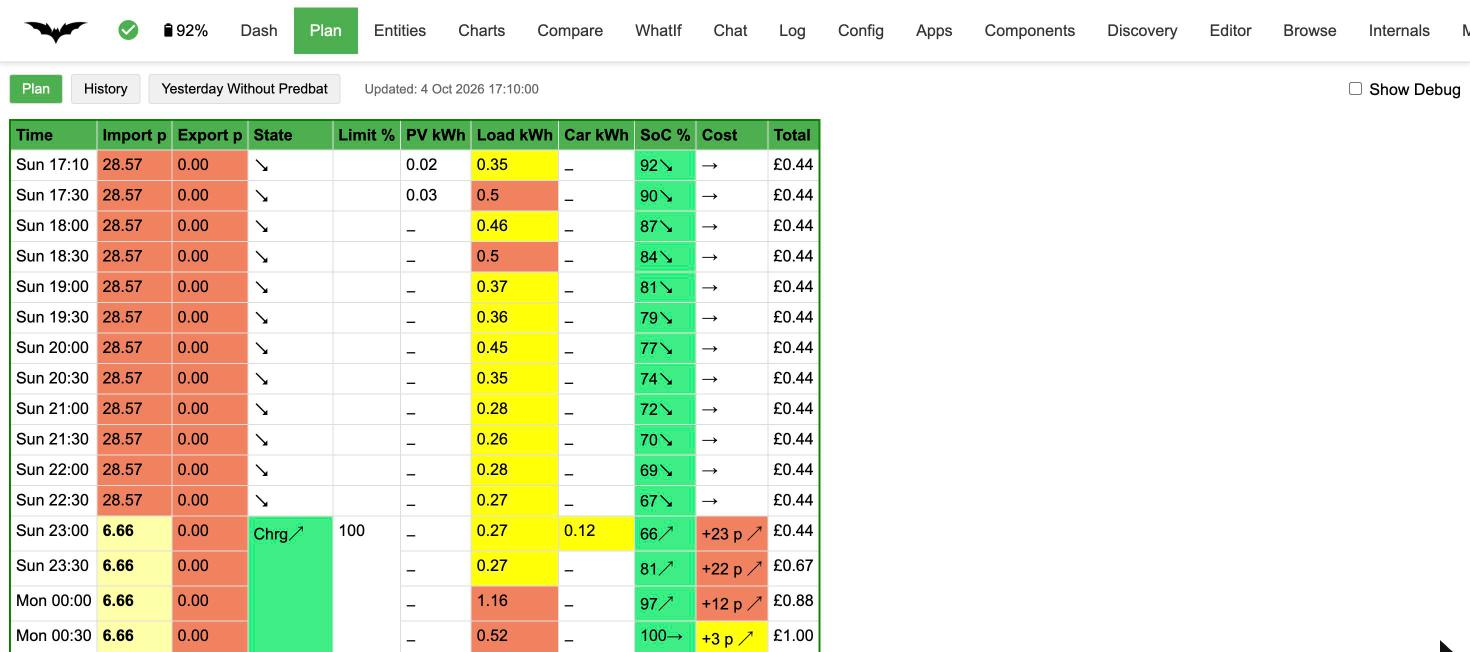
Why I swapped my own automations for Predbat
My automations ran on one idea. Look at tomorrow’s solar forecast, work out how much of the car’s battery the sun will fill, then top up the rest overnight on the cheap rate of our EDF EV tariff. Get that number right and you use every bit of solar, paying the night rate for the rest.
Get it wrong and it costs you, one of two ways. Charge too much overnight and there’s no room left for the sun, so a few pennies of solar go to waste. Charge too little and you end up buying daytime electricity at the full price. Our export pays nothing, so any solar that leaves the house is a straight loss.
I’ve always erred on the side of caution. I’d rather lose a bit of solar than import at peak rate, and my automations were built that way.
Predbat works on the same principle; it just does more of the maths. It plans the day in half-hour slots, learns how much the house uses from the last week of history and replans every few minutes. So far it’s as effective as my own setup and a touch more accurate, because it plans the whole day rather than one overnight target. It also handles EDF’s free electricity sessions, which mine never did. The cautious streak carries over too: in step 5 I tell it to assume we’ll use 20% more than forecast.
What it saves
Home Assistant has logged our grid import, split into peak and off-peak, since April. I priced each summer month two ways: what we paid on today’s EDF rates (28.57p peak, 6.66p off-peak) and what the same electricity would cost on a flat-rate tariff at today’s 28p a unit.
| Month (2026) | Imported | Our cost | Flat 28p | Saved |
|---|---|---|---|---|
| May | 581kWh | £62.10 | £162.62 | £100.52 |
| June | 774kWh | £81.12 | £216.75 | £135.63 |
| July | 689kWh | £76.07 | £192.84 | £116.77 |
| August | 355kWh | £35.15 | £99.31 | £64.16 |
| September | 487kWh | £50.18 | £136.38 | £86.19 |
| Average | 577kWh | £60.92 | £161.58 | £100.66 |
That’s about £100 a month through the summer, or £3.30 a day. 82% of everything we bought from the grid came in at the night rate. The heat pump does its hot water overnight, the dishwasher and washing machine wait for 23:00, and the Leaf covers most of the expensive evening.
Two caveats. These are unit rates only; standing charges differ between tariffs, so check yours. And most of the saving comes from the time-of-use tarif plus the Leaf shifting the evening onto the night rate. Predbat’s gain over my own automations is very small: it’s a bit more accurate, so less solar goes to waste, but if you compare it against not having the battery and Predbat, there are some big saving to be had!
How it works
The Indra unit is sold (we bought it as part of a limited trial) as a vehicle to grid (V2G) and vehicle to home (V2H) charger. We run it as V2H: the car powers the house, not the grid, because export earns us 0p due to the Feed In Tariff (FiT). Predbat runs as an app inside Home Assistant, and to Predbat the Leaf looks like any other home battery. One that occasionally drives off to Tesco.
Predbat has no built-in support for the Indra. It does have a “service API” mode for unsupported inverters, where you tell it which Home Assistant actions to call to start a charge, stop a charge and hold the battery. The Indra integration exposes one control that matters, a select called select.indra_v2h_operating_mode. The whole job is mapping Predbat’s decisions onto that select.
| Predbat wants to | Indra mode | What the car does |
|---|---|---|
| Charge from the grid | CHARGE | Charges at full rate |
| Normal running (Predbat calls this “Demand”) | LOAD_MATCH | Powers the house, soaks up spare solar |
| Freeze or hold, no sun | IDLE | Neither charges nor discharges; the house runs from the grid |
| Freeze or hold, sun up | EXPORT_MATCH | Won’t discharge, but takes solar that would otherwise be exported |
| Force export | DISCHARGE | Not used here (export pays 0p). Map it if your export rate makes it worthwhile |
Predbat can’t set a charge rate or a target state of charge on the Indra. It starts a charge, watches the car’s SoC and stops the charge itself when the target is reached. At the Indra’s 6kW that works fine.
Before you start
You need these working in Home Assistant first:
- The Indra V2H integration from github.com/creatingwake/ha-indrav2h. Add it in HACS as a custom repository (category Integration), or copy
custom_components/indrav2hinto your config folder. Restart, then add “Indra V2H” under Settings, Devices & services and log in with your Indra account. It gives you the operating mode select plus sensors for the car’s SoC, power to and from the car and the Indra’s grid CT. - Your solar inverter, with a live AC power sensor in W or kW. We use SolarEdge over Modbus; anything with a power sensor works.
- Your tariff: import times and prices, plus your export rate. If you’re with EDF or Octopus, their Home Assistant integration lets Predbat read live rates and free sessions instead (step 3).
- Your Leaf’s battery size and the Indra’s reserve. Predbat treats these as two separate numbers (table below).
Predbat’s soc_max is the energy between 0% and 100% on the car’s own SoC reading, after battery wear. Don’t take the Indra’s reserve off it. That goes in reserve, and Predbat does the subtraction itself. Get your battery health (SOH) from LeafSpy.
| Leaf | Usable when new | Indra reserve | soc_max | Available to the house |
|---|---|---|---|---|
| 24kWh | about 21kWh | 30% | 21 × SOH | 70% of soc_max |
| 40kWh | about 39kWh | 10% | 39 × SOH | 90% of soc_max |
| 62kWh (e+) | about 59kWh | 10% | 59 × SOH | 90% of soc_max |
Worked example: our 24kWh Leaf at 85% SOH gives soc_max: 17.85 and reserve: 30, so about 12.5kWh is available to run the house.
The Indra sensors I rely on (entity names are from our install, so check yours under Settings, Devices):
| Entity | Meaning | Sign |
|---|---|---|
select.indra_v2h_operating_mode | The control Predbat drives | |
sensor.indra_v2h_vehicle_state_of_charge | Car SoC, % | |
sensor.indra_v2h_power_to_ev | Power into the car, W | Negative when the car powers the house |
sensor.indra_v2h_house_load | Despite the name, this is the Indra’s grid CT, W | Positive = import, negative = export |
Check the signs on your own system. With the car discharging, solar + grid − power_to_ev should equal what the house is using. If it doesn’t add up, one of your sensors is the other way round and the invert settings in step 3 need changing.
Step 1: install Predbat
- Follow the Predbat install guide to add the Predbat app (add-on). Its config is an
apps.yamlfile in the app’s own config folder, which on a standard install is/addon_configs/6adb4f0d_predbat/. The6adb4f0dpart comes from the Predbat repository, so it’s the same for most people, but check yours: Predbat’s log prints it on start-up as “App slug is …”. Newer Home Assistant releases may show the parent folder asapp_configsinstead. - Start it once with the template file. It will complain about
template: true. That’s expected, and it creates Predbat’s entities. - Turn on
switch.predbat_set_read_onlystraight away. Predbat will plan but won’t touch the Indra until you turn it off.
To edit apps.yaml, use the File editor app (turn off “enforce basepath” in its settings so it can see /addon_configs) or mount the Samba share on your computer.
Step 2: energy helpers
Predbat learns your usage from daily kWh sensors that count up through the day. It needs house load (excluding the car), grid import, grid export and solar. Most solar integrations don’t give you a clean house-load figure once an Indra is in the mix, so I built them from live power sensors. Create all of these in Settings, Devices & services, Helpers, Create helper.
House load power (template helper, sensor)
Everything the house uses, excluding the car. Swap in your own solar power sensor; if it reports kW, multiply by 1000. Unit W, device class Power, state class Measurement. Call it House Load Total, which gives you sensor.house_load_total.
{{ states('sensor.YOUR_SOLAR_AC_POWER') | float(0)
 + states('sensor.indra_v2h_house_load') | float(0)
 - states('sensor.indra_v2h_power_to_ev') | float(0) }}
Grid import and export power (template helpers)
Grid Import Power, unit W, Power, Measurement:
{{ [states('sensor.indra_v2h_house_load') | float(0), 0] | max }}Grid Export Power, unit W, Power, Measurement:
{{ [0 - states('sensor.indra_v2h_house_load') | float(0), 0] | max }}Turn power into energy (Integral helpers)
One Integral (Riemann sum) helper per power sensor. Settings for all of them: method Left, metric prefix k, time unit hours, precision 3, max sub-interval 1 minute.
| Helper name | Source |
|---|---|
| House Load Energy | sensor.house_load_total |
| Grid Import Energy | sensor.grid_import_power |
| Grid Export Energy | sensor.grid_export_power |
| Solar AC Energy | Your solar AC power sensor |
Daily totals (Utility meter helpers)
One utility meter per Integral helper. Meter reset cycle Daily, no tariffs, “periodically resetting” off.
| Helper name | Source | Used in apps.yaml as |
|---|---|---|
| House Load Today | House Load Energy | load_today |
| Grid Import Today | Grid Import Energy | import_today |
| Grid Export Today | Grid Export Energy | export_today |
| Solar AC Today | Solar AC Energy | pv_today |
These helpers start with no history. Predbat averages the last seven days of load, so its forecasts will be thin for the first week. Run in read-only mode for that week; it fills the gaps from the power sensor in the meantime.
Step 3: apps.yaml
Replace the template apps.yaml in Predbat’s config folder (step 1) with this. Everything marked CHANGE is specific to your system. Predbat spots that the file has changed and reloads it within a minute or so; restart the app if it doesn’t.
---
pred_bat:
  module: predbat
  class: PredBat

  prefix: predbat
  timezone: Europe/London
  currency_symbols:
    - '£'
    - 'p'
  threads: auto

  # --- Custom inverter definition for the Indra -----------------------
  # Predbat can't set a charge rate or target SoC on the Indra; it just
  # switches the operating mode and stops the charge when SoC hits target.
  num_inverters: 1
  inverter_type: INDRA
  inverter:
    name: "Indra V2H"
    has_rest_api: False
    has_mqtt_api: False
    has_service_api: True
    output_charge_control: "none"
    charge_control_immediate: False
    current_dp: 1
    charge_discharge_with_rate: False
    has_charge_enable_time: False
    has_discharge_enable_time: False
    has_target_soc: False
    target_soc_used_for_discharge: False
    has_reserve_soc: False
    has_timed_pause: False
    time_button_press: False
    support_charge_freeze: True
    support_discharge_freeze: False
    has_ge_inverter_mode: False
    has_idle_time: False
    has_time_window: False
    charge_time_format: "S"
    charge_time_entity_is_option: False
    can_span_midnight: True
    clock_time_format: "%Y-%m-%d %H:%M:%S"
    num_load_entities: 1
    soc_units: "%"
    write_and_poll_sleep: 5

  # --- Mode mapping ---------------------------------------------------
  charge_start_service:
    - service: select.select_option
      entity_id: select.indra_v2h_operating_mode
      option: "CHARGE"
  charge_freeze_service:
    - service: script.predbat_indra_hold   # step 4: IDLE, or EXPORT_MATCH in sun
      repeat: True                         # re-run every cycle so it follows the sun
  charge_stop_service:
    - service: select.select_option
      entity_id: select.indra_v2h_operating_mode
      option: "LOAD_MATCH"
  # No discharge_start_service: our export pays 0p. If yours pays well,
  # add one that selects DISCHARGE and a discharge_stop_service (LOAD_MATCH).

  # --- The car battery --------------------------------------------------
  soc_percent:
    - sensor.indra_v2h_vehicle_state_of_charge
  soc_max:
    - 17.85        # CHANGE: usable kWh x SOH. 24kWh Leaf at 85% = 17.85
  reserve:
    - 30           # CHANGE: Indra reserve. 30 for a 24kWh Leaf, 10 for 40/62kWh
  battery_min_soc: 30   # CHANGE: same as reserve
  battery_rate_max:
    - 6000         # Indra max, in watts (literal number, not kW)
  inverter_limit:
    - 6000
  inverter_reserve_max: 100
  battery_power:
    - sensor.indra_v2h_power_to_ev
  battery_power_invert:
    - true         # Predbat wants positive = discharging

  # --- Live power -------------------------------------------------------
  pv_power:
    - sensor.YOUR_SOLAR_AC_POWER      # CHANGE
  load_power:
    - sensor.house_load_total
  grid_power:
    - sensor.indra_v2h_house_load
  grid_power_invert:
    - true         # Predbat wants import negative

  # --- Daily energy (step 2 helpers) -------------------------------------
  load_today:
    - sensor.house_load_today
  import_today:
    - sensor.grid_import_today
  export_today:
    - sensor.grid_export_today
  pv_today:
    - sensor.solar_ac_today           # CHANGE: check the entity ID HA gave it

  # --- Solar forecast: Predbat calls Forecast.Solar itself ---------------
  # CHANGE every value. One block per roof plane.
  # azimuth_zero_south: 0 = south, -90 = east, 90 = west.
  forecast_solar:
    - latitude: 51.50          # CHANGE: your latitude
      longitude: -0.12         # CHANGE: your longitude
      declination: 30
      azimuth: -58
      kwp: 3.36
      efficiency: 0.95
      azimuth_zero_south: True
  forecast_solar_max_age: 4
  forecast_solar_open_meteo_backup: true

  # --- Tariff (pence per kWh), CHANGE ---------------------------------
  # Option A (what we use): live rates from the EDF or Octopus Energy
  # integration. Point at the "current rate" sensor; Predbat finds the
  # matching day-rates event entities itself and picks up price changes.
  metric_octopus_import: sensor.YOUR_SUPPLIER_electricity_XXXX_current_rate   # CHANGE
  rates_import_override:
    - start: "03:00:00"
      end: "06:00:00"
      rate_increment: -0.01   # 0.01p nudge: Predbat charges late, so the car isn't sat at 100% all night

  # Option B: fixed rates. Use this instead of the two keys above.
  # rates_import:
  #   - start: "23:00:00"
  #     end: "03:00:00"
  #     rate: 6.99
  #   - start: "03:00:00"
  #     end: "06:00:00"
  #     rate: 6.98
  #   - start: "06:00:00"
  #     end: "23:00:00"
  #     rate: 30.0

  rates_export:
    - rate: 0

  # Optional: free electricity sessions (see below)
  octopus_free_session: sensor.edf_free_electricity_events

  days_previous:
    - 7
  load_filter_threshold: 30
Optional: a second car on a different charger
We also have a plug-in hybrid on an OpenEVSE. Without this block, every night it charges looks like house load and Predbat over-plans. With it, Predbat strips that car’s charging out of the history and knows when it’s charging. Change the entities to suit your charger, then add this to apps.yaml:
  num_cars: 1
  car_charging_energy: sensor.openevse_openevse_total_energy_usage   # kWh, incrementing
  car_charging_power: sensor.openevse_openevse_charging_power
  car_charging_now: sensor.openevse_openevse_charging_power          # 200W+ counts as charging
  car_charging_planned: binary_sensor.openevse_vehicle_connected
  car_charging_planned_response:
    - 'on'
    - 'true'
  car_charging_battery_size:
    - 11
  car_charging_soc: sensor.your_car_battery
  car_charging_limit: sensor.your_car_charge_target
Optional: free electricity sessions (EDF or Octopus)
EDF (Power Perks and Sunday Saver) and Octopus (Octoplus free electricity) both run free sessions. Predbat treats each one as a 0p slot and plans to fill the car in it, using octopus_free_session. It reads a list of start and end times from an entity’s events attribute. You don’t need to give Predbat your supplier login; it just reads what your supplier’s Home Assistant integration already has.
Octopus (the Octopus Energy integration by BottlecapDave): the free session event entity is already in the right shape, so point straight at it, for example event.octopus_energy_ACCOUNT_octoplus_free_electricity_session_events.
EDF (the EDF Energy integration): the sessions sit in an attribute called free_electricity_windows and events is empty, so Predbat sees nothing. Add this template sensor to configuration.yaml under your template: key to copy them across, then reload template entities (Developer tools, YAML). Change the event entity to yours; search for “free electricity session events”.
  - sensor:
      - name: "EDF Free Electricity Events"
        unique_id: edf_free_electricity_events_predbat
        icon: mdi:lightning-bolt-circle
        state: >
          {% set e = 'event.edf_energy_ACCOUNT_free_electricity_session_events' %}
          {{ ((state_attr(e, 'events') or []) + (state_attr(e, 'free_electricity_windows') or [])) | count }}
        attributes:
          events: >
            {% set e = 'event.edf_energy_ACCOUNT_free_electricity_session_events' %}
            {% set ns = namespace(l=[]) %}
            {% for w in (state_attr(e,'events') or []) + (state_attr(e,'free_electricity_windows') or []) %}
              {% set ns.l = ns.l + [{'start': (w.start if w.start is string else w.start.isoformat()),
                                     'end': (w.end if w.end is string else w.end.isoformat())}] %}
            {% endfor %}
            {{ ns.l }}
Check it under Developer tools, States: sensor.edf_free_electricity_events should show the number of sessions, with an events list of plain start and end times. When Predbat picks it up, its log says “Octopus free slots changed from [] to […]”. Past sessions stay in the list; Predbat ignores them.
Convert the times to text. My first version passed the windows straight through. Home Assistant holds the start and end as Python datetime objects, so the attribute came out as one long string instead of a list and Predbat couldn’t read it. The isoformat() loop above fixes that.
Step 4: the hold script and the hold-charging fix
Predbat has two ways of keeping the battery where it is. Freeze charging calls the freeze action we mapped. Hold charging happens when a charge window’s target is at or below the current SoC. On most inverters Predbat holds by writing a target SoC or reserve. The Indra has neither, so Predbat falls back to its stop action, LOAD_MATCH, and the car carries on powering the house while the plan thinks it’s holding. I spotted this in the history on the first night.
The fix is a script that does the hold properly, used by both. Predbat calls it for freeze, and a small automation calls it for hold.
Script: Predbat – Indra Hold
Settings, Automations & scenes, Scripts, new script, Edit in YAML. Give it the ID predbat_indra_hold and change the solar sensor. If your solar sensor reports kW, change above: 100 to above: 0.1.
alias: Predbat - Indra Hold (freeze/hold)
description: >-
  Holds the car for Predbat freeze/hold slots. No solar: IDLE.
  Solar over 100W: EXPORT_MATCH so spare solar still goes in.
  Only writes the mode if it differs.
mode: queued
max: 3
sequence:
  - choose:
      - conditions:
          - condition: numeric_state
            entity_id: sensor.YOUR_SOLAR_AC_POWER
            above: 100
        sequence:
          - if:
              - condition: not
                conditions:
                  - condition: state
                    entity_id: select.indra_v2h_operating_mode
                    state: EXPORT_MATCH
            then:
              - action: select.select_option
                target:
                  entity_id: select.indra_v2h_operating_mode
                data:
                  option: EXPORT_MATCH
    default:
      - if:
          - condition: not
            conditions:
              - condition: state
                entity_id: select.indra_v2h_operating_mode
                state: IDLE
        then:
          - action: select.select_option
            target:
              entity_id: select.indra_v2h_operating_mode
            data:
              option: IDLE
Automation: Predbat – Indra Hold Charging fix
alias: Predbat - Indra Hold Charging fix
description: >-
  1) Hold charging: Predbat can't hold the Indra itself, so run the hold script.
  2) Watchdog: Predbat only sends a command when its own status changes, so it
  never puts the Indra back after a hold. If Predbat has been in plain Demand
  for 2+ minutes and the Indra isn't in LOAD_MATCH, set LOAD_MATCH.
  Does nothing while Predbat is read-only.
mode: queued
max: 3
triggers:
  - trigger: state
    entity_id: predbat.status
    to: Hold charging
  - trigger: time_pattern
    minutes: /5
conditions:
  - condition: state
    entity_id: switch.predbat_set_read_only
    state: "off"
actions:
  - choose:
      - conditions:
          - condition: state
            entity_id: predbat.status
            state: Hold charging
        sequence:
          - action: script.predbat_indra_hold
      - conditions:
          - condition: state
            entity_id: predbat.status
            state: Demand
            for:
              minutes: 2
          - condition: not
            conditions:
              - condition: state
                entity_id: select.indra_v2h_operating_mode
                state: LOAD_MATCH
        sequence:
          - action: select.select_option
            target:
              entity_id: select.indra_v2h_operating_mode
            data:
              option: LOAD_MATCH
Don’t skip the watchdog half. My first version only did the hold. Predbat thinks it already sent LOAD_MATCH when the hold started, so when the hold ended at 06:00 it sent nothing. The car sat in IDLE all morning, didn’t cover the house and let solar escape to the grid that it should have stored. The watchdog puts it back within five minutes.
It also means a mode you set by hand in the Indra app gets reverted while Predbat is in Demand. Turn on read-only first if you want manual control.
Step 5: Predbat settings in Home Assistant
These are Predbat’s own entities, set from its dashboard or Settings, Entities. Turn on expert mode first, as some of them only appear with it. This is also where the caution lives.
| Entity | Value | Why |
|---|---|---|
switch.predbat_expert_mode | On | Unlocks the settings below |
select.predbat_mode | Control charge | It ships as Monitor, which plans no charging at all. Use “Control charge & discharge” only if you mapped DISCHARGE |
input_number.predbat_load_scaling | 1.2 | Assumes you’ll use 20% more than forecast. A margin while history builds, and after |
input_number.predbat_load_scaling10 | 1.3 | Must be at or above the line above, or Predbat warns every run |
input_number.predbat_best_soc_keep | 8 (kWh) | Soft target to still have in the car at the end of the day. Absolute kWh, including the reserve. Ours is about 45% |
input_number.predbat_pv_scaling | 0.85 | Forecast.Solar ran about 15% optimistic for us. Compare a week of actual solar against the forecast and set this to the ratio |
switch.predbat_car_charging_from_battery | Your call | Only matters with a second car configured. On lets the V2H car help charge the other one |
Low-power charging doesn’t work on the Indra. switch.predbat_set_charge_low_power asks for a lower charge rate, which Predbat can’t set here. Leave it off; the 0.01p rate nudge in apps.yaml does the “finish near morning” job instead.
Step 6: a full-charge switch for driving days
On a sunny forecast Predbat leaves room in the car for solar. That’s right, unless you’re unplugging and driving in the morning. This gives you a switch: turn it on in the evening and wake up to a full car that stays full until 09:00 or until you unplug.
Create a Toggle helper first (Settings, Helpers). Mine is input_boolean.v2h_full_charge. You also need a sensor that tells you the car is plugged in; mine is a template called sensor.is_car_connected with the state Connected. Change both to match yours, and set 17.85 to your soc_max.
alias: Predbat - Leaf Full Charge (V2H Full Charge switch)
description: >-
  ON: Predbat charges the car to 100% overnight. At 06:00, if still on and
  plugged in, Predbat freezes the car 06:00-09:00 so it stays full.
  09:00, unplugging, or turning the switch off clears everything.
mode: queued
triggers:
  - trigger: state
    entity_id: input_boolean.v2h_full_charge
    to: "on"
    id: "on"
  - trigger: state
    entity_id: input_boolean.v2h_full_charge
    to: "off"
    id: "off"
  - trigger: time
    at: "06:00:00"
    id: morning
  - trigger: time
    at: "09:00:00"
    id: end_hold
  - trigger: state
    entity_id: sensor.is_car_connected
    from: Connected
    id: unplugged
actions:
  - choose:
      - conditions:
          - condition: trigger
            id: "on"
        sequence:
          - action: input_number.set_value
            target:
              entity_id: input_number.predbat_best_soc_min
            data:
              value: 17.85
      - conditions:
          - condition: trigger
            id: "off"
        sequence:
          - action: input_number.set_value
            target:
              entity_id: input_number.predbat_best_soc_min
            data:
              value: 0
          - action: select.select_option
            target:
              entity_id: select.predbat_manual_freeze_charge
            data:
              option: "off"
      - conditions:
          - condition: trigger
            id: morning
          - condition: state
            entity_id: input_boolean.v2h_full_charge
            state: "on"
          - condition: state
            entity_id: sensor.is_car_connected
            state: Connected
        sequence:
          - action: select.select_option
            target:
              entity_id: select.predbat_manual_freeze_charge
            data:
              option: "06:00,06:30,07:00,07:30,08:00,08:30"
      - conditions:
          - condition: trigger
            id:
              - unplugged
              - end_hold
          - condition: state
            entity_id: input_boolean.v2h_full_charge
            state: "on"
        sequence:
          - action: input_boolean.turn_off
            target:
              entity_id: input_boolean.v2h_full_charge
input_number.predbat_best_soc_min only exists with expert mode on. It forces every planned charge to at least that many kWh, so setting it to the full capacity means “charge to 100%”. The morning freeze uses the hold script, so any early sun still goes into the car.
Step 7: go live
- Run read-only for about a week and check the plan each day. The Predbat plan card on a dashboard makes this easy.
- Check Predbat’s log for errors: Settings, Apps, Predbat, Log.
- Check the minimum SoC in the Indra app matches your Predbat reserve (30% on a 24kWh Leaf, 10% on the bigger ones). It’s the backstop if Home Assistant or Predbat falls over.
- Disable any old automations that drive the Indra’s mode or schedule. Mine included. Two things writing to the same select will fight.
- Turn off
switch.predbat_set_read_only, and turn on the read-only-while-unplugged automation if you’re using it (below). - Next morning, compare the history of
select.indra_v2h_operating_modeagainstpredbat.status. Freeze and hold should show IDLE (or EXPORT_MATCH in sun), charging should show CHARGE, everything else LOAD_MATCH.
Things that caught me out
The Home Assistant Forecast.Solar sensors are no use to Predbat
They only give daily totals. Predbat needs the half-hourly profile, so it calls Forecast.Solar itself from the forecast_solar block. Copy the roof details from your Home Assistant integration, but watch the azimuth: Home Assistant uses compass bearings (180 = south). With azimuth_zero_south: True, subtract 180, so 122° becomes −58 and 210° becomes 30.
Predbat ships in Monitor mode
My first plan showed no charging at all. That’s the select.predbat_mode default; switch it to Control charge.
Power limits are literal watts
battery_rate_max: 6000, not 6. Predbat only converts units when the value is a sensor. A literal 6 means 6 watts, and a very strange plan.
The plan only charges what it thinks you’ll use
With no safety margin and thin history, it planned to reach the evening with the car exactly at the floor. Too tight for me. Load scaling and best SoC keep (step 5) fixed that. On sunny days it will still leave room in the car when export pays nothing; it’s using the sun as the charge.
Other loads in the house history
Anything big that runs at night, like a second EV or the heat pump’s hot water cycle, ends up in the load forecast. That’s fine for things the house really uses. A second EV is better set up as a car (step 3) so Predbat doesn’t count it twice.
The car leaves the house
Predbat assumes the battery is always there. While the car’s out, the SoC it sees is stale and it keeps planning (and switching the Indra’s mode) as if the car were at home. This automation puts Predbat into read-only five minutes after you unplug, then takes it out again a minute after you plug back in, so it replans from a fresh SoC. The delays stop a quick unplug and replug from flipping it, and it re-checks after a Home Assistant restart. Change sensor.is_car_connected to your own plugged-in sensor and its states.
alias: Predbat - Read-only while Leaf unplugged
description: >-
  Unplugged for 5 min: Predbat read-only. Plugged in for 1 min: read-only off.
  Also re-checks after an HA restart.
mode: queued
triggers:
  - trigger: state
    entity_id: sensor.is_car_connected
    to: Disconnected
    for:
      minutes: 5
    id: unplugged
  - trigger: state
    entity_id: sensor.is_car_connected
    to: Connected
    for:
      minutes: 1
    id: plugged_in
  - trigger: homeassistant
    event: start
    id: ha_start
actions:
  - choose:
      - conditions:
          - condition: or
            conditions:
              - condition: trigger
                id: unplugged
              - condition: and
                conditions:
                  - condition: trigger
                    id: ha_start
                  - condition: state
                    entity_id: sensor.is_car_connected
                    state: Disconnected
          - condition: state
            entity_id: switch.predbat_set_read_only
            state: "off"
        sequence:
          - action: switch.turn_on
            target:
              entity_id: switch.predbat_set_read_only
      - conditions:
          - condition: or
            conditions:
              - condition: trigger
                id: plugged_in
              - condition: and
                conditions:
                  - condition: trigger
                    id: ha_start
                  - condition: state
                    entity_id: sensor.is_car_connected
                    state: Connected
          - condition: state
            entity_id: switch.predbat_set_read_only
            state: "on"
        sequence:
          - action: switch.turn_off
            target:
              entity_id: switch.predbat_set_read_only
This automation owns the read-only switch. If you turn read-only on by hand while the car is plugged in, it stays on until the next unplug and replug. During the week of read-only testing in step 7, leave it off, or plugging the car back in will take Predbat live.
The forecast was too sunny
After a few days the car was ending the day lower than planned. Predbat had trusted a solar forecast that came in about 15% high, so it skipped grid charging it needed. Setting pv_scaling to 0.85 (step 5) fixed it. Check yours once you have a week of real solar history.
Failed notifications
Predbat sends status alerts through notify.notify, which goes to every registered mobile device. One stale device (an old phone, an Echo Show with the companion app) makes the whole call fail. Remove old entries under Settings, Devices & services, Mobile App.
More info and resources
- Indra V2H integration for Home Assistant (GitHub)
- Predbat documentation, including adding an unsupported inverter and the settings reference
- LeafSpy, for your Leaf’s battery health (SOH)
Written October 2026 against Predbat v9.2 and Home Assistant 2026.9. Entity names may differ on your install.